Cedreo
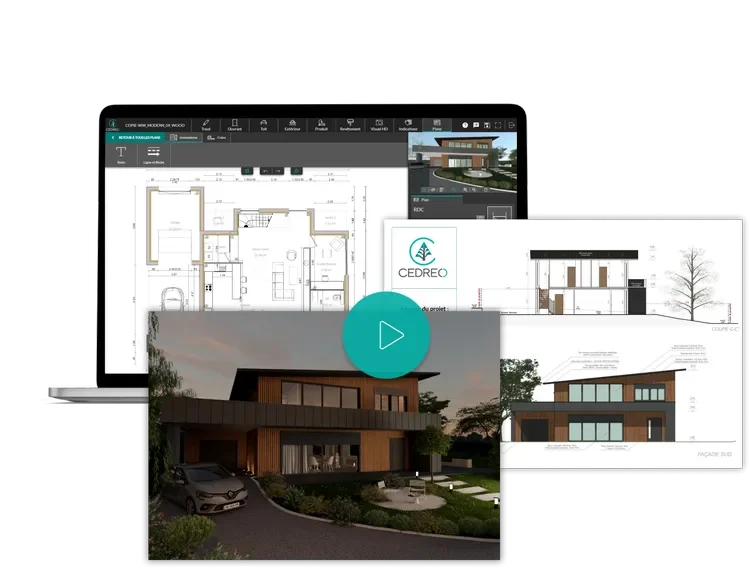
Cedreo is a browser-based conceptual home design suite that pairs fast floor plans, terrain sketches, and interior furnishing with photorealistic renders so builders and remodelers can shorten design-led sales cycles.

Residential pros rarely lose deals because they lack ideas; they lose hours translating sketches into something a homeowner believes. Cedreo keeps concept massing, dimensioned plans, and presentation renders inside one web workspace so account executives can iterate during the first meeting instead of waiting on outsourced visuals.
Marketing pages cite measurable sales-enablement metrics such as closing opportunities twice as fast or trimming pre-sales spend, framed around replacing bolt-on drafting shops with in-house iteration (Cedreo homepage, 2026). Whether those percentages apply to every market or team size is debatable, but the workflow goal is clear: collapse early-phase drawing, visualization, and reuse of seed plans.
Drawing happens entirely in Chrome, Firefox, Edge, or Safari with GPU-friendly shading for turntable views and sun orientation controls called out in feature lists. Terrain tools emphasise parcels, setbacks, earthworks, and annotations rather than civil-grade corridors, which matches semi-custom residential sales rather than DOT jobs.
Pricing mixes a limited free tier with Personal project packs and subscription Professional or Enterprise bundles priced through Cedreo’s regional offer engine (offer-manager API snapshot for USD, 2026). Upload helpers accept JPEG, PNG, or DWG underlays so teams can trace existing surveys without rebuilding geometry from scratch.
Specifications
Pricing
Platforms
Used for
Used by
Tasks
Pros and cons
Pros
- Low IT friction because teams launch projects inside standard browsers.
- Transparent USD tiers surfaced through the official pricing API for quick budgeting.
- Focus on repeatable starter homes speeds templating across neighborhoods.
- Enterprise tracks respond to multi-seat builders needing shared asset libraries.
Cons
- Heavy reliance on stable broadband makes jobsite trailers with weak LTE risky.
- Rendering credits expire on subscription cadences unless add-on packs are purchased.
- Not aimed at heavy civil coordination or fabrication-ready BIM detail.
Key features
Browser-first drafting: Sketch floor plans, roof diagrams, sections, and elevations without installing CAD binaries.
Terrain quick modes: Lay out parcels, setbacks, slopes, and retaining cues aimed at sales-ready site storytelling.
Catalog-driven interiors: Populate kitchens, baths, and living spaces from Cedreo libraries with controlled rendering credits.
Photoreal outputs: Generate staged interior and exterior shots minutes after layout tweaks for homeowner approvals.
Team workspaces: Enterprise tiers focus on shared libraries, drawing packages, and collaboration hooks suited to mid-size builders.
DWG underlays: Upload raster or vector backgrounds to align new geometry with legacy surveys.
Pricing
Free
per month
Free
One active project with limited furnishings and five bundled renderings; account access expires after three years without upgrading (Cedreo FAQ, 2026).
Professional (monthly)
per month
$129.00
Indicative USD quote from offer-manager.cedreo.com snapshot; regional taxes may apply.
Personal project pack
$139.00
Single-project purchase includes twenty rendering credits per Cedreo API snapshot; confirm bundle rules in-app.
Enterprise (monthly)
per month
$159.00
Enterprise tier from Cedreo API snapshot; includes collaboration features described in FAQ.
Professional (annual)
per year (12 mo)
$948.00
Annual prepay pricing per Cedreo API snapshot; unused monthly render credits expire each cycle unless add-ons are purchased.
Enterprise (annual)
per year (12 mo)
$1,428.00
Annual prepay Enterprise pricing per Cedreo API snapshot.
Frequently asked questions
How much does Cedreo cost per month?
Cedreo’s public API sample for the United States lists Professional subscriptions at USD 129 per month or USD 948 per year, Enterprise at USD 159 per month or USD 1428 per year, and Personal project packs at USD 139 per purchase, while the Free tier remains USD 0 (offer-manager.cedreo.com pricing snapshot, 2026). Currency tables shift when the storefront detects another region, so confirm inside your logged-in quote.
Does Cedreo run on Mac or Windows desktops?
Cedreo is delivered as responsive web software that officially supports current Chrome, Firefox, Edge, and Safari on Windows or macOS hardware meeting the documented Core i5 guidance (Cedreo pricing FAQ, 2026). No native installers ship; performance hinges on the browser and GPU instead.
Which CAD or image formats can I upload as backgrounds?
Support articles state users may bring JPEG, PNG, or DWG files into a project and trace new geometry above those references (Cedreo pricing FAQ, 2026). That workflow suits scanned surveys or legacy CAD exports more than live BIM federation.
Can Cedreo replace full construction document sets?
Cedreo targets conceptual packages and persuasion-grade visuals early in sales. Presentation document modules exist, yet structural stamping, MEP coordination, and jurisdiction-specific permit sheets still belong in detailed BIM or CAD platforms downstream.
How does Cedreo compare with SketchUp-focused visualization stacks?
SketchUp-centric pipelines excel at organic massing with optional rendering extensions, whereas Cedreo bundles sales collateral, terrain storytelling, and rendering credits inside one subscription tuned for production builders. Teams already invested in SketchUp may still export imagery, but Cedreo emphasises templated housing catalogs instead of generic modeling freedom.
Who benefits most from Cedreo Enterprise?
Enterprise messaging highlights multi-user builders that must share projects, construction drawing bundles, and governance across offices (Cedreo pricing FAQ, 2026). If you only sell a few customs per year, Personal or Professional tiers usually suffice.
Tutorials and learning
Sources
Other Design tools
- Delve by Sidewalk LabsEnterprise quote
Delve by Sidewalk Labs is a web-based generative planning application that lets real estate teams and municipalities spawn and rank large
- Digital Blue FoamEnterprise quote
Digital Blue Foam is a browser-based early-stage AEC platform that blends generative massing, contextual GIS-style inputs, and KPI
- DraftedSubscription
Drafted is a web-based AI residential planning workspace that generates and iterates single-family house plans while exposing a large
- dRofusEnterprise quote
dRofus is a building lifecycle data platform for owners, designers, and contractors that keeps room programs, equipment registers, and model
- D.TO (Design Together)Freemium
D.TO (Design Together) is a Revit-integrated design platform that delivers AI-assisted building assembly guidance, construction detailing,
- DwellitoFreemium
Dwellito is an online marketplace for prefabricated and modular homes, ADU plans, and related services that helps homeowners compare
- FinchSubscription
Finch is a generative design copilot for architects that pairs AI-assisted massing and unit planning with quick performance feedback, rule
- Floor Plan AIFreemium
Floor Plan AI is a web-based layout design product that turns text prompts into editable 2D floor plans and optional 2.5D or isometric views