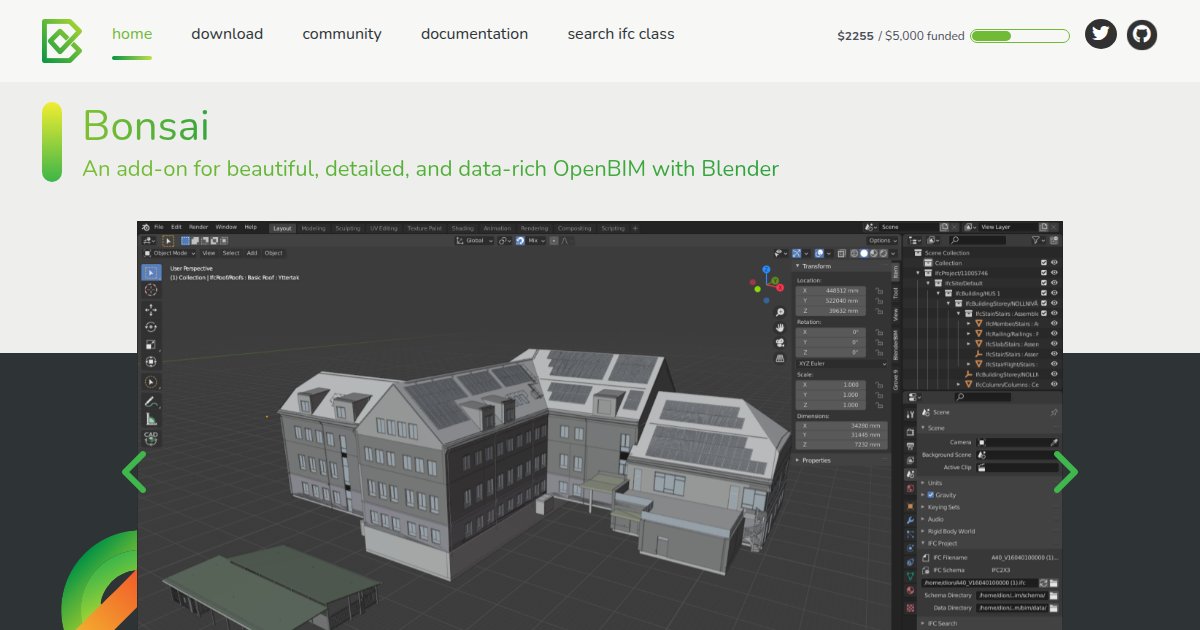
Bonsai
Bonsai is a free, open source Blender add-on that acts as a native IFC authoring environment for OpenBIM, so teams can view, edit, and enrich Industry Foundation Classes models without leaving Blender.

When you want open standards instead of a closed file format, IFC is the usual interchange language, yet many studios still bounce models through several apps just to keep semantics intact. Bonsai sits inside Blender and treats IFC as the first-class data model, which means walls, systems, costs, and schedules stay linked while you work on geometry and metadata in one place (Bonsai documentation, 2025).
Because it builds on IfcOpenShell, the same volunteer-led toolkit many researchers and practitioners use for geometry and schema work, Bonsai inherits a long lineage of openBIM tooling rather than a single vendor roadmap. That matters for small practices, educators, and developers who need to inspect relationships, run clash checks, or sketch MEP routes without paying per seat just to experiment with a dataset (IfcOpenShell project materials, 2025).
Installation follows the normal Blender add-on path, and the project publishes quickstart material for exploring an existing IFC, creating simple building elements, and generating drawings. Community chat and forums linked from the docs help when you hit edge cases in real project files, which is typical for any authoring stack that has to interpret IFC from many sources (Bonsai documentation, 2025).
Specifications
Pricing
Platforms
Used for
Used by
Tasks
Pros and cons
Pros
- No subscription fee for the core add-on
- Deep IFC semantics instead of mesh-only workflows
- Large Blender community for general 3D skills
- Source code available for inspection and extension
Cons
- Requires learning Blender as well as BIM concepts
- Community support model rather than a single vendor helpdesk
- Performance depends on your hardware and model size
- Less common in large enterprise procurement stacks than proprietary suites
Key features
Native IFC editing: Open, modify, and author IFC entities while preserving BIM relationships and attributes.
Drawing output: Produce plan, section, and elevation style outputs with annotations tied to the model.
Coordination: Run clash detection and manage coordination issues across federated disciplines.
MEP and structures: Model distribution systems and work with structural analysis representations and steel profiles.
4D-style scheduling: Build construction schedules, critical path views, and sequence animations from model data.
Quantities and cost: Derive quantities and build cost schedules with formula-driven links to elements.
Pricing
Open source release
Contact sales
No vendor subscription; confirm Blender and IfcOpenShell licensing terms on their official sites.
Frequently asked questions
How much does Bonsai cost?
Bonsai is free and open source software. You still need Blender, which is also free software under its own license. Optional donations to related community projects are separate and do not change the zero license cost for the add-on itself (bonsaibim.org, 2025).
Does Bonsai run on macOS and Linux?
Yes. Bonsai installs as a Blender add-on, so it follows Blender’s desktop support on Windows, macOS, and Linux. There is no separate web-only edition; you run it inside a local Blender session (docs.bonsaibim.org, 2025).
What file formats does Bonsai use?
The workflow centers on Industry Foundation Classes, commonly shared as .ifc files. The documentation stresses that BIM meaning lives in the IFC schema, not in a generic mesh export, so you should expect to work natively in IFC rather than treat the model as a dumb OBJ (docs.bonsaibim.org, 2025).
Can Bonsai generate construction drawings and schedules?
Yes. The official introduction lists 2D drawing views such as plans, sections, and elevations, plus construction schedules, critical path analysis, and sequence animations derived from the model (docs.bonsaibim.org, 2025).
How does Bonsai compare with using Blender alone for a building model?
Plain Blender excels at meshes and visuals, but it does not natively store BIM relationships the way an IFC-first tool does. Bonsai adds that semantic layer so quantities, systems, and issues stay tied to the building model instead of breaking when you edit geometry (docs.bonsaibim.org, 2025).
Who is Bonsai best suited for?
Teams that want openBIM delivery, educators demonstrating IFC concepts, and developers who already use IfcOpenShell often fit well. The site positions it for audit, authoring, coordination, costing, scheduling, and facility-oriented sensor workflows, so both designers and technical BIM leads are in scope (bonsaibim.org, 2025).